

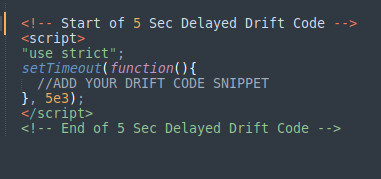
Discover how delaying the Drift Chatbot by 5 seconds can boost your site's performance. Our easy guide and JavaScript code example make it simple for anyone to implement.Delay Drift for 5 SecondsThe Drift Chatbot is an excellent tool for engaging with visitors and generating leads. However, it can sometimes impact your site's performance, especially if it loads immediately when the page loads. To overcome this issue, you can delay the Drift code snippet by 5 seconds using JavaScript. This simple technique can help improve your site's load time and overall user experience.### IntroductionIs your site's performance taking a hit because of the Drift Chatbot? You're in the right place. While Drift Chatbots are invaluable for engaging visitors and generating leads, they can sometimes slow down your site's loading speed. In this guide, we'll show you how to delay the Drift Chatbot by 5 seconds using a simple JavaScript setTimeout function. This delay can significantly enhance your site's performance without sacrificing the benefits of the chatbot.### Why Delay the Drift Chatbot?Loading the Drift Chatbot immediately can compete with other critical resources, leading to slower page load times. By delaying the chatbot, you ensure that essential content loads first, providing a better user experience. Here are the main benefits:- Improved Site Performance: Delays allow critical content to load faster.
- Better User Experience: Users see and interact with important content sooner.
- Enhanced Engagement: Once the site is fully loaded, the chatbot can engage visitors without interrupting their initial experience.### How to Delay the Drift ChatbotDelaying the Drift Chatbot is a straightforward process that involves wrapping the Drift code snippet inside a
setTimeoutfunction. Here's how you can do it:#### Step-by-Step Guide#### 1. Locate Your Drift Code Snippet: Find the Drift code snippet you received from Drift. It usually looks something like this:
!function() {
  var t;
  if (t = window.drift = window.driftt = window.driftt || [], !t.init) {
    if (t.invoked) return void (window.console && console.error && console.error("Drift snippet included twice."));
    t.invoked = !0, t.methods = ["identify","config","track","reset","debug","show","ping","page","hide","off","on"],
    t.factory = function(e) {
      return function() {
        var n = Array.prototype.slice.call(arguments);
        return n.unshift(e), t.push(n), t;
      };
    }, t.methods.forEach(function(e) {
      t[e] = t.factory(e);
    }), t.load = function(t) {
      var e = 3e5, n = Math.ceil(new Date() / e) * e, o = document.createElement("script");
      o.type = "text/javascript", o.async = !0, o.crossOrigin = "anonymous", o.src = "https://js.driftt.com/include/" + n + "/" + t + ".js";
      var i = document.getElementsByTagName("script")[0];
      i.parentNode.insertBefore(o, i);
    };
  }
}();
drift.SNIPPET_VERSION = '0.3.1';
drift.load('your-embed-id');
2. Wrap the Code in setTimeout: To delay the loading of the Drift Chatbot by 5 seconds, wrap the entire snippet in a setTimeout function like this:
setTimeout(function() {
  !function() {
    var t;
    if (t = window.drift = window.driftt = window.driftt || [], !t.init) {
      if (t.invoked) return void (window.console && console.error && console.error("Drift snippet included twice."));
      t.invoked = !0, t.methods = ["identify","config","track","reset","debug","show","ping","page","hide","off","on"],
      t.factory = function(e) {
        return function() {
          var n = Array.prototype.slice.call(arguments);
          return n.unshift(e), t.push(n), t;
        };
      }, t.methods.forEach(function(e) {
        t[e] = t.factory(e);
      }), t.load = function(t) {
        var e = 3e5, n = Math.ceil(new Date() / e) * e, o = document.createElement("script");
        o.type = "text/javascript", o.async = !0, o.crossOrigin = "anonymous", o.src = "https://js.driftt.com/include/" + n + "/" + t + ".js";
        var i = document.getElementsByTagName("script")[0];
        i.parentNode.insertBefore(o, i);
      };
    }
  }();
  drift.SNIPPET_VERSION = '0.3.1';
  drift.load('your-embed-id');
}, 5000);
3. Test Your Implementation: After updating your code, make sure to test it. Open your site, and use the browser's developer tools to verify that the Drift Chatbot loads 5 seconds after the rest of the page.### ConclusionDelaying the Drift Chatbot by 5 seconds can significantly enhance your site's performance and user experience. This simple adjustment ensures that critical content loads first, keeping your visitors engaged and happy. Implement the setTimeout function as demonstrated, and enjoy a faster, more responsive website.