

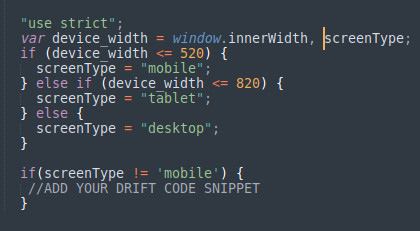
[Struggling with the Drift Chatbot on mobile devices? Our easy guide shows you how to disable it by adjusting the device width settings. Perfect for beginners!How to Disable Drift Chatbot in MobileDrift Custom Chatbots are fantastic tools for turning interest into pipeline by pre-qualifying visitors and scheduling meetings with sales. However, they can be quite annoying when viewed on mobile devices. Here's how you can disable the Drift Chatbot on mobile by checking the device width. If the width is greater than 520px, you can include the Drift code snippet.### IntroductionIs the Drift Chatbot driving you up the wall on your mobile device? You're not alone. While Drift Chatbots are great for engaging visitors and generating leads, they can become quite a nuisance on mobile screens. Fortunately, there’s a straightforward way to disable the Drift Chatbot on mobile devices. In this guide, we’ll walk you through the steps to make your mobile experience smoother and more user-friendly.### Why Disable Drift Chatbot on Mobile?Drift Chatbots are designed to enhance user engagement by initiating conversations, pre-qualifying leads, and scheduling meetings. But on mobile devices, the small screen space can make these chatbots more of a hindrance than a help. Disabling the chatbot on mobile ensures:- Better user experience
- Reduced distractions
- Faster page load times### Step-by-Step Guide to Disable Drift Chatbot on MobileLet’s dive into the process of disabling the Drift Chatbot on mobile devices. This method involves checking the device width and conditionally including the Drift code snippet.#### 1. Identify Your Device WidthFirst, you need to determine the width of the device. In web development, this is typically done using CSS media queries or JavaScript. For our purposes, JavaScript will be the tool of choice.#### 2. Use JavaScript to Check Device WidthYou can use JavaScript to read the device width and decide whether to load the Drift Chatbot. Here’s a simple script that checks if the device width is greater than 520px.]
<script>
  if (window.innerWidth > 520) {
    // Include Drift code snippet
    !function() {
      var t;
      if (t = window.drift = window.driftt = window.driftt || [], !t.init) {
        if (t.invoked) return void (window.console && console.error && console.error("Drift snippet included twice."));
        t.invoked = !0, t.methods = ["identify","config","track","reset","debug","show","ping","page","hide","off","on"],
        t.factory = function(e) {
          return function() {
            var n = Array.prototype.slice.call(arguments);
            return n.unshift(e), t.push(n), t;
          };
        }, t.methods.forEach(function(e) {
          t[e] = t.factory(e);
        }), t.load = function(t) {
          var e = 3e5, n = Math.ceil(new Date() / e) * e, o = document.createElement("script");
          o.type = "text/javascript", o.async = !0, o.crossOrigin = "anonymous", o.src = "https://js.driftt.com/include/" + n + "/" + t + ".js";
          var i = document.getElementsByTagName("script")[0];
          i.parentNode.insertBefore(o, i);
        };
      }
    }();
    drift.SNIPPET_VERSION = '0.3.1';
    drift.load('your-embed-id');
  } else {
    console.log("Drift Chatbot disabled on mobile devices.");
  }
</script>
[### Simple ExampleTo make it clearer, let’s break down the example:1) Check Device Width: if (window.innerWidth > 520) checks if the device width is greater than 520px.
2) Include Drift Code Snippet: If the condition is true, the Drift script is included and executed.
3) Disable on Mobile: If the condition is false (i.e., on mobile devices), a message is logged to the console indicating that the Drift Chatbot is disabled.### Tips for Beginners- Testing: Always test your changes on various devices to ensure the chatbot behaves as expected.
- Code Placement: Place your JavaScript code in the
<head>section of your HTML for better performance. - Error Handling: Implement error handling to manage any potential issues with loading the Drift script.### ConclusionBy following these simple steps, you can easily disable the Drift Chatbot on mobile devices, ensuring a smoother user experience. This method checks the device width and conditionally loads the Drift code snippet, making it a practical solution for many developers.]